Image to Text Converter
Use our free image to text converter to instantly convert any image into editable text. Upload your photo and read text from image online.
Drag & Drop Your Image / ( Ctrl+V )
Crop and Rotate Your Picture
Related Tools

Extracting text from an image is very easy using our tool. Our image-to-text converter is a tool used for extracting text from images, which users can copy and download.
Read text from image online using optical character recognition (OCR) technology, advanced algorithms, and AI models. You can use this online OCR tool to turn JPGs or PNGs into text, digitize printed documents and handwritten notes, and much more.
How to Convert an Image to Text Online?
Follow these steps to convert image to text with our photo to text converter online.
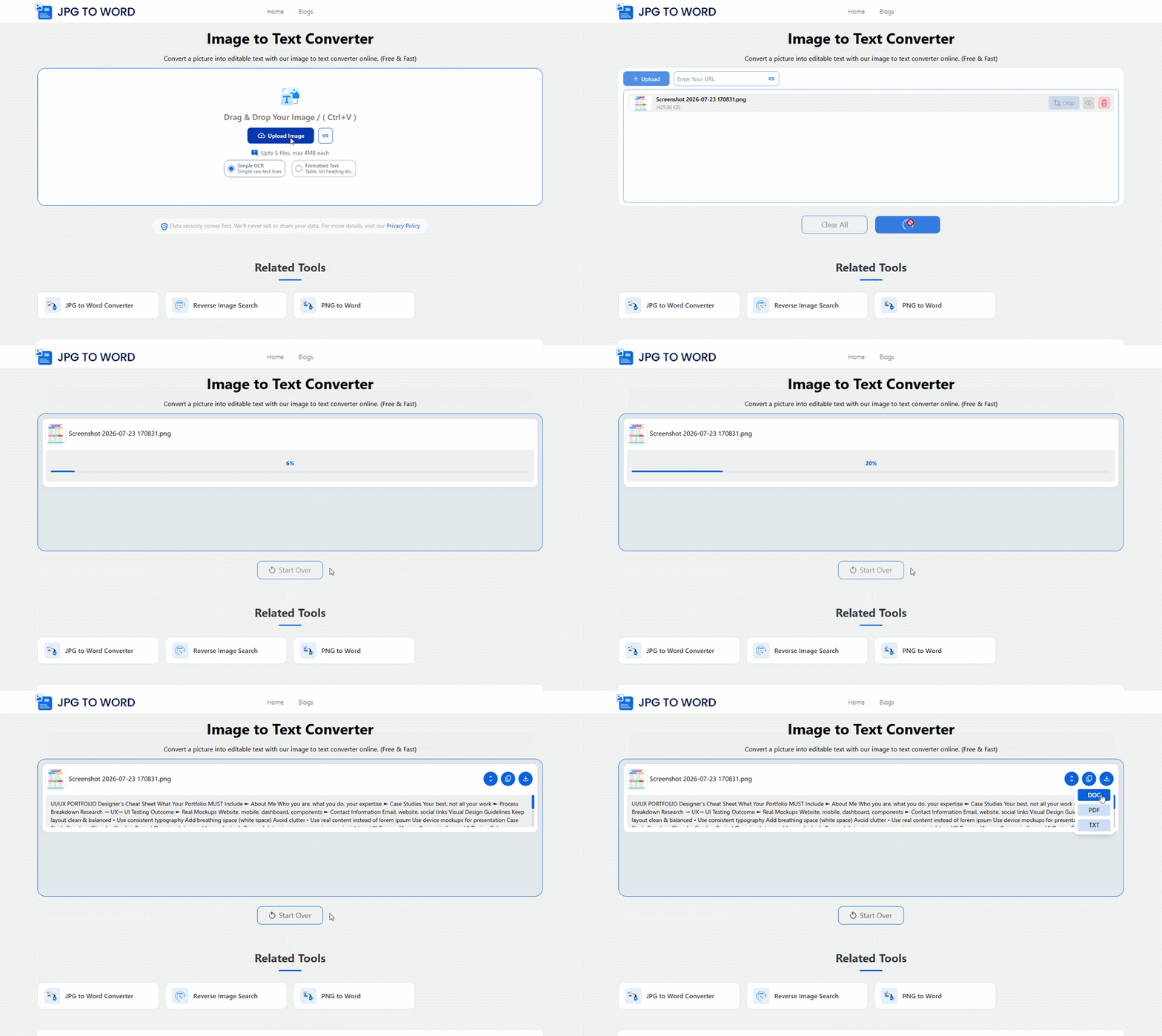
- Upload, paste, or drop your image inside the tool. You can also add the URL of an image that is publicly available on the internet.
- Choose Simple OCR for plain text or Formatted to keep the original formatting if required.
- Click the ‘Convert’ button to start picture to text conversion.
- The image to text converter lets you copy and paste the extracted text or allows you to download the text as PDF, TXT, HTML, Markdown, or Word.
How Does Image to Text Converter Work?
Our Image to Text Converter uses Optical Character Recognition (OCR) technology and advanced image-processing algorithms to detect and extract text from images. It analyzes the uploaded image, recognizes readable characters, and converts them into editable text within seconds.
The process involves the following steps:
Image Scanning:
The tool scans the uploaded image to identify areas containing text.
Character Recognition:
OCR technology detects and recognizes letters, numbers, and symbols within the image.
Pattern Matching:
The recognized characters are compared against language and character patterns to improve recognition accuracy.
Text Extraction:
The extracted text is organized into an editable format, allowing you to copy or download it instantly.
This process enables the tool to accurately extract text from screenshots, scanned documents, handwritten notes, receipts, books, and other image files while preserving the original content as closely as possible.
Features of Our Online OCR Tool
Free to Use
Our online image to text converter tool is completely free to use. It uses OCR technology to convert an image to text without any prior registration or sign-up.
Multiple Images Convert Option
Our online OCR tool supports multiple conversions at once. You can convert 5 different images into text at once.
No Daily Caps
Like other online OCR tools, our tool has no daily usage limits. You can convert unlimited images into text for free (5 at a time).
Support Multiple Image Formats
This online picture to text converter accepts multiple modern image file types. You can convert WebP, PDF, GIF, BMP, SVG, PNG, and JPG to text.
Multiple Download Options
You get to download the converted text as DOCX, PDF, or TXT. For formatted OCR results, you can also download them as HTML and Markdown.
Advanced Recognition
Our JPG to text converter uses advanced recognition. It efficiently extracts mathematical syntax, microtexts, and text from low-resolution blurry images.
Photo to Text Converter - When Do You Need It?
Office Documents
Turn printed office papers into editable and searchable text. You can use our picture to text tool for digitizing invoices, forms, letters, and other business files. This saves time and helps you keep your documents in digital form.
Study Notes
Take a photo of your class notes or whiteboard and turn them into digital text. You can edit, save, and share your notes without typing them again. It also makes studying much easier.
Data Entry
Stop typing data by hand. Use this photo to text converter to extract text from documents in seconds. Then copy the text into any other file you need. Or download as an editable Word document or a searchable PDF.
Books and Pamphlets
Convert text from books, newspapers, magazines, and printed pages into editable text. You can copy the content, search it, translate it, or use it in your own documents.
Screenshots and Photos
Convert JPG to text and copy text from screenshots, posters, banners, menus, signs, or product labels. Instead of typing every word, extract the text with one click and use it anywhere you want.
Personal Use
Save recipes, letters, handwritten notes, or important papers in digital form. You can keep them safe, edit them later, and share them with family or friends whenever you need.